
Device statuses
Every column on the Devices page is designed to be honest about what is known versus claimed. Statuses are reported by the agent itself; a device that has gone quiet reads as Unknown rather than as still doing whatever it last claimed.
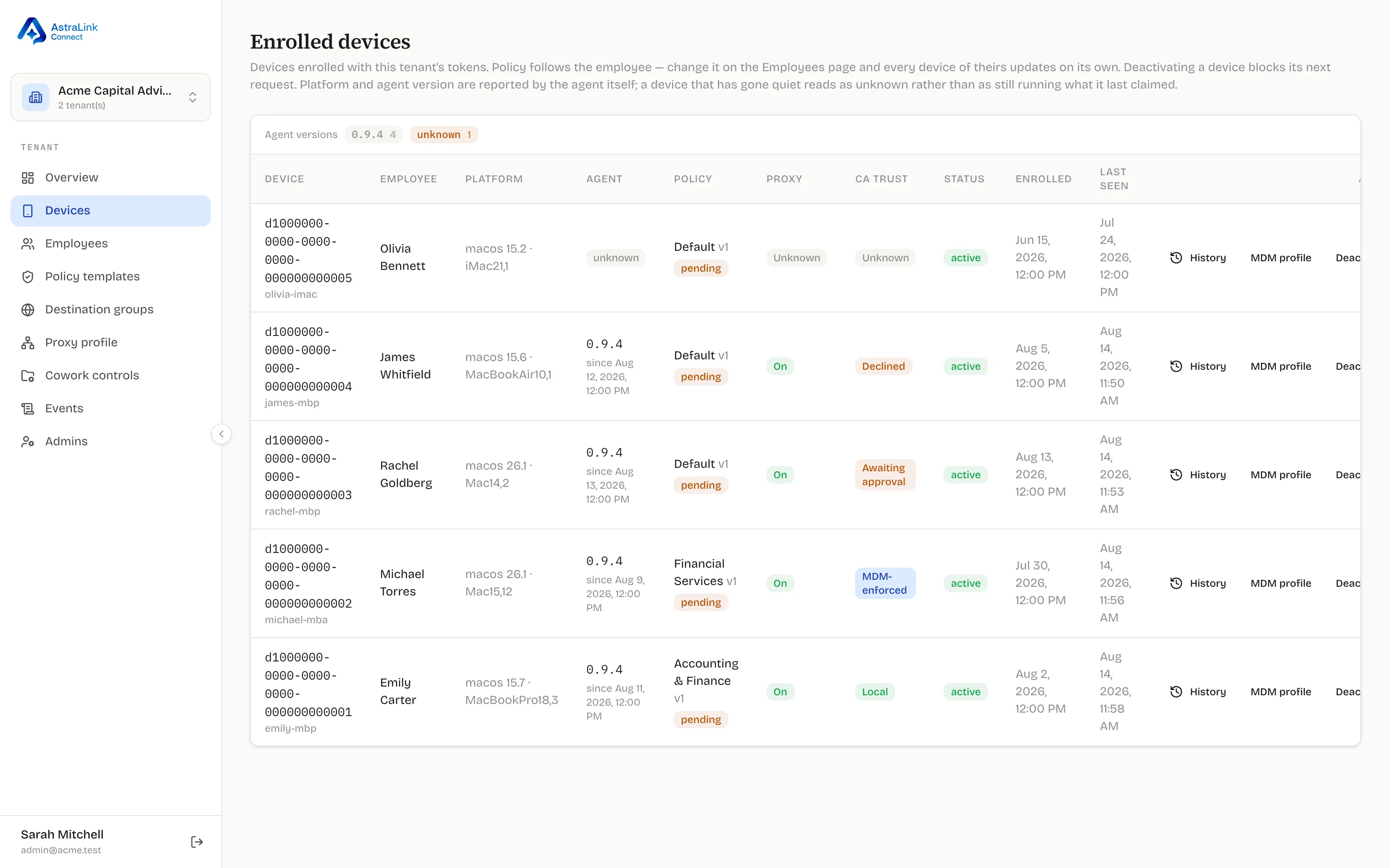
The columns
Section titled “The columns”| Column | Meaning | Notes |
|---|---|---|
| Device / Employee / Platform | Identity and inventory | Hostname and platform are self-reported by the agent |
| Agent | The version the agent last reported, and since when | A device quiet for too long shows stale/unknown rather than its last claim |
| Policy | The governing template and convergence | up to date is an authoritative content match; pending / running vN means the device is converging on the latest version |
| Proxy | Whether interception is configured and running | On, degraded, error, disabled — self-reported per check-in |
| CA trust | Which trust tier holds | See the table below |
| Status | The revocation switch | active / deactivated |
| Enrolled / Last seen | Liveness | Last seen updates on every authenticated agent request |
CA trust badges
Section titled “CA trust badges”Ordered by precedence — a device matching several shows the most serious:
| Badge | Meaning | Your move |
|---|---|---|
| Declined | The employee said no to the trust prompt | A person made a choice — talk to them, or push the CA certificate profile |
| Awaiting approval | Prompted; no answer yet | Wait, or chase — an unanswered prompt can sit for days |
| MDM-enforced | Trusted via your MDM profile, outside employee reach | The strong posture; nothing to do |
| Local | Trusted via the employee’s own approval | A legitimate steady state — enforced, but employee-revocable |
| Unknown | Old agent, never reported, or quiet too long | Update the agent / investigate why the device is silent |
Background on the two tiers: CA trust tiers.
Per-row actions
Section titled “Per-row actions”- History — the policy decisions that have governed this device over time.
- MDM profile — downloads this device’s CA certificate profile. Audited; does not change the badge by itself (download ≠ install).
- Deactivate — the revocation switch. The device’s next request is rejected: event upload and policy delivery stop until you reactivate it or it re-enrolls with a fresh credential. Note the agent keeps enforcing its last policy locally — deactivation cuts the device off from the backend; it does not switch off protection on the machine.
Why “Unknown” is a feature
Section titled “Why “Unknown” is a feature”An offline Mac, a stopped agent, and a pre-release agent all read as Unknown. That is deliberate: Unknown means “not currently accounted for,” which on a fleet dashboard is actionable information. The product never paints a stale green over a device it cannot vouch for.